Language Server for Moose Development
The MooseStack Language Server provides real-time ClickHouse SQL intelligence for sql tagged template literals in TypeScript Moose projects. It gives you syntax validation, auto-completions, hover documentation, and code formatting as you write SQL in your editor.
Warning:
Experimental: TypeScript only.
Features
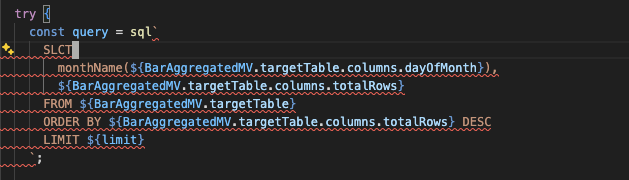
- Error diagnostics - Instant feedback on SQL syntax errors
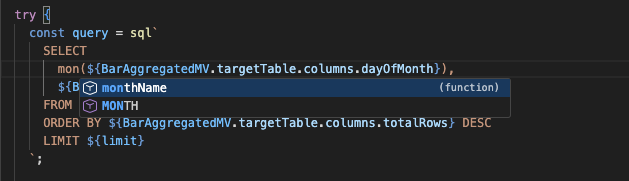
- Auto-complete - ClickHouse functions, keywords, data types, table engines, and more
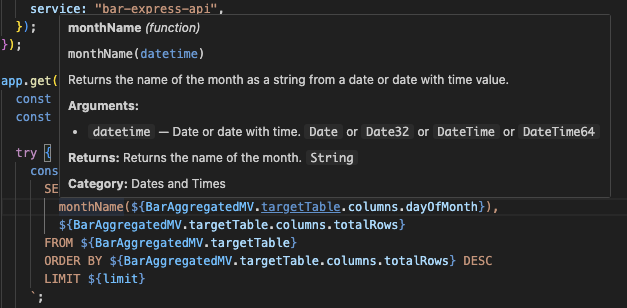
- Hover documentation - Syntax help and examples for ClickHouse functions
- Code actions - Format SQL directly from your editor
Error Diagnostics
Auto-complete
Hover Documentation
sql.statement vs sql.fragment
The language server uses sql.statement and sql.fragment to determine how to validate your SQL:
sql.statement— validated as complete SQL (must be a valid standalone query)sql.fragment— skipped for statement-level validation (partial SQL-like conditions or expressions)sql(deprecated) — treated as a statement by default
Using the explicit tags gives you accurate diagnostics without false positives on SQL fragments:
// ✅ Validated as a complete statementconst query = sql.statement`SELECT * FROM ${UserTable} WHERE status = 'active'`; // ✅ Not validated as a statement (would fail since it's not complete SQL)const condition = sql.fragment`status = ${status}`;See the sql template tag reference for full details.
Installation
For VS Code and Cursor, search for "MooseStack LSP" in the Extensions panel and click Install.
For other installation methods visit the GitHub repo.
Learn More
For setup instructions for other editors, configuration options, and troubleshooting, see the MooseStack LSP repository.